
Live Audio Translation (TTS)
Listeners don't just read — they hear the khutbah in their own language with a natural voice, alongside the live transcript. Ideal for elderly attendees and visually impaired members.
Real-time khutbah captions, spoken translation, scheduled auto-start, and live Quran tracking — all under one roof.
Launch a live khutbah in seconds — or let AutoPilot start it for you on schedule. The congregation reads live captions in their own language, optionally hears a natural spoken translation, and can follow the recitation ayah-by-ayah during Mukabela and Taraweeh. Configure once, save a preset, and start the next session in a single tap.
KhutbaLive now goes beyond live captions: a spoken translation voice, scheduled auto-start, and Quran-aware live tracking — all in one module.
Listeners don't just read — they hear the khutbah in their own language with a natural voice, alongside the live transcript. Ideal for elderly attendees and visually impaired members.
Schedule recurring sessions — Friday Jumu'ah, nightly Taraweeh, weekly lectures — and AutoPilot starts them automatically with your saved settings. If the assigned device doesn't pick up, the team gets a fallback email so no session is missed.
Ayah-by-ayah live tracking with translation, tuned to follow slower, melodic recitation styles. The highlighted verse stays in step with the imam throughout Ramadan's nightly readings.
Use KhutbaLive when you need the full live sermon flow in one place: start the session from Quick Actions, choose the capture mode, add AI context or Quran mode when needed, and let the congregation join instantly through a QR code with real-time multilingual transcript on mobile.
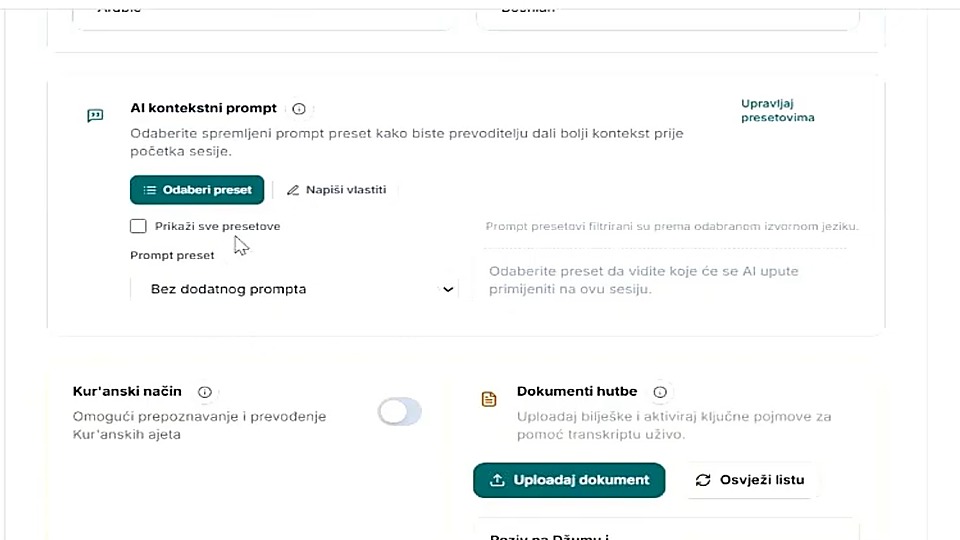
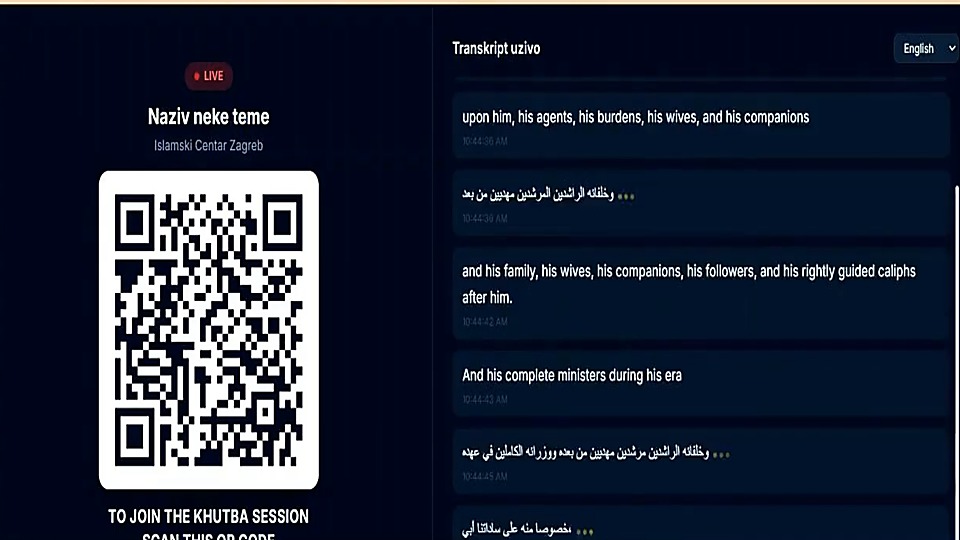
The English KhutbaLive demo walks through the exact live workflow a mosque team needs on Friday: start the session, choose the right capture mode, improve translation context before going live, and give the congregation a clean QR-based live transcript page.
Choose saved AI prompt presets or write your own instructions, enable Quran mode when needed, and upload supporting khutbah documents before the imam goes live.
The public page switches into a live experience with a QR code, language selection, and continuously updating transcript cards that listeners can follow in real time.
Later, the same session can be turned into downloadable transcripts, translated text pages, and archive-ready material for the mosque website.
Open the app, try the live workflow, or continue exploring the rest of the MinbarLive modules.